Site seeing – March 31

If you’re a regular reader of the blog, you’ll know that I’ve had some health challenges in the last week. It is perhaps fitting today, for the last day of March, that we look at objects other than me in need of repair.

I love a good wrecked model railcar, especially when they’re done right. Unfortunately scaling down a wreck is not easy. Plastic is not steel, especially in scale and so plastic tends to be an order of magnitude thicker than steel would be in a scale model. Getting it right is more an art form than a science. Which leads us to today’s sites…

Site 1: Model railroad hobbyist forum (Link here)

Over on the MRH Forum there’s a thread running on ‘Train Wreck Experiments with a heat gun and weathering’.  I really like the work that went into this unit. And there’s some great advice on modelling wrecks from those in the know on this thread.

Site 2: Model railroad hobbyist forum (Link here)

Also on the MRH forum is another thread at the moment on dents and dings on cars. There are some reall good comments starting to come out in the conversation, and some great pictures as well like this one by Verne Niner:

Read on for some more great ideas.

Site 3: Jeff Eggert’s Yard Office (Link here)

I’ve vistited Jeff’s website again, and again, and again. His scratchbuilt grain hopper (linked here) is a masterpiece, and in line with today’s dent, bent and rent theme. I hope that you enjoy.

Talk to you again in April.

I made some ties

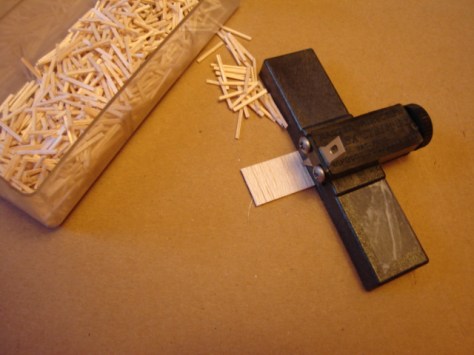
Chris Mears over, on the Prince Street blog, spent some quality time recently ripping out Balsa ties for his railroad.

I bought one of these tools a while ago to make ties for my future O gauge layout (also using Balsa). A big thanks to Chris though for simplifying the idea for me.

Chris Mears's avatarPrince Street

DSC01617

Armed with a fresh sheet of balsa and my trusty balsa stripper, I have just finished making up one heck of a pile of ties. The process couldn’t be simpler. I’m starting with balsa sheet. Instead of cutting individual ties to length, I find it easier to cut the sheet to length, matching the length of my ties. I can then rip these into individual ties using the balsa stripper. Since the tool manages the width of each tie, the only really careful work is dividing the sheet by length. In all, I find it relaxing work. I figure I cut about a thousand ties this evening and this brings me another step closer to getting some track in place.

View original post

Kidney stones – I must have rocks in my head

Wednesday morning, 1:00 AM and a call to the ambulance because I thought my appendix had ruptured. Unfortunately I was not that lucky. The result, after 3 days in the hospital, is I’m stabilised, but have further surgery to get through (in just on 4 weeks) to hopefully break up the kidney stones .

For the next few days I’m going to be taking it easy, I’m still quite sore, but expect to see more posts in the next couple of days.

Thanks for reading the blog and I’ll be back with you again soon.

Regards

Andrew Martin

Site seeing March 24

I’ve followed Richard’s layout efforts for a while now on YouTube as he has built and modified Everard Junction. He’s not modelled a location, or an era, or a specific set of locomotives and wagons, he’s managed to capture the complete railway experience. And while Everard Junction is not a real location, it sure feels like one.

Site 1: Everard Junction – BR 1988 – 1990 (Link Here)

Richard started building the layout in late 2009 and has worked on it ever since. His aim was to create something reliable as his earlier layout had very poor track work and caused issues every time he used it. Everard Junction was to be bigger, reliable and above all he wanted it to be fun to operate.

Details

  • Era – British Rail sectorisation in the late 1980s.
  • Location – Somewhere not far from the great western mainline with connections to Reading, Didcot, Bristol, Bath and Birmingham
  • Stock – Diesel locomotives and DMUs of the period

He most recently published a great British Rail styled 1980’s PR video which you can watch here:

There are a range of very useful and thoughtful videos available on Richard’s YouTube channel (see the link to that below). Well worth a watch as he builds the layout and makes Everard Junction a real slice of railway operations.

Resources:

Site seeing March 23

Among the best forums to be on for new US small layout modelling is the USA and Canadian forum over on RMWeb (Link Here). There’s always someone building a layout for a show, or home and the ideas simply keep on coming.

Site 1: 59th and Rust (Link here)

Today’s site seeing adventure belongs to one that I’ve followed for some time by Ray (Long Island Jack) – 59th and Rust. What I really enjoy is his sense of urban rust and decay. Too green for me, as I’d like to see a lot more brown grass and stubs, but never the less, what a great work of art.

Enjoy the videos that show the basics of a switching session, again about the 20 minute mark, and enjoy those Alco sounds. Now if only we had some Alco diesel smoke…

In this first video a PC RS-11 is switching Goldberger Doll

In this video the PC RS-11 is switching Tino Tools

All the best for the evening from a cooling (it was warm 5 minutes ago) and windy Ballarat.

Site Seeing March 22

Bound for South Australia

Small, smart, practical exhibition layouts are not as easy to find as I’d like in Australia. Most club layouts are huge affairs, requiring many willing hands, a box trailer or van, and a pioneering spirit to move from home to exhibition to home.

Site 1: “Commercial Road” – 1960s South Australian Railways (Link Here)

One such layout that just popped up on my radar on Thursday is the Commercial Road layout of Gavin Thrum of South Australia. If you’ve not come in contact with the railways of South Australia before then you are in for a real treat.

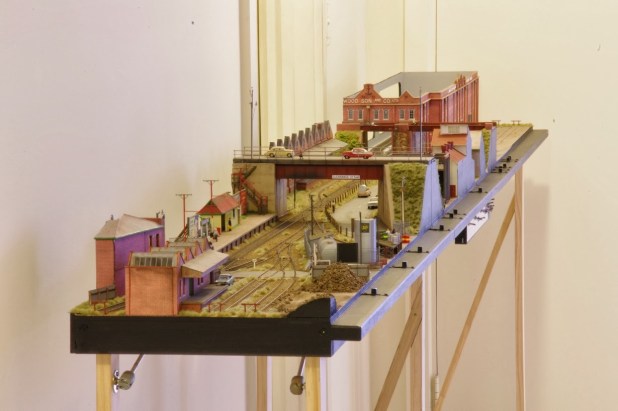
Commercial Road – view the website for more great pictures of the layout

The South Australian railways are an interesting study in Multiculturalism. Originally built to English standards,  and operating practices, in 3 gauges (Irish Broad at 5′ 3″, Standard Gauge at 4′ 8 1/2″, and Narrow Gauge at 3′ 6″) the states rail system was a hodge-podge of types and wooden bodies goods and freight wagons until 1922 when the state’s worst financial deficit reared its ugly head.

To the rescue rode Commissioner William Webb (of the Missouri Kansas and Texas RR) and from 1922 Mr Webb revolutionised railroading in the south.

Engine 502 – 1953 – Public Domain Image courtesy of Wikipedia (more detial below)

Speed signalling, large steam engines, metal freight cars, Brill railcars, and more became the norm. Today there are still three gauges in use and lots of action through the state and in Adelaide where electrification has finally arrived (link here); Very similar to the Victorian VLocity diesel railcar (link here) that I travel in down to Melbourne. (I love electric traction)

But I digress; back to the layout. It’s a great small layout measuring 10′ 10″ long by just 13″ wide. Hop on over to his site and take a look at the images and the modelling. Really well worth a visit.

Resources

Wikipedia article on the SAR – Link Here

More on the big steamers of the Web Era

Why I chose not to design my layout – Part 5

Somewhere back in a previous post I am certain that I published a basic op session. Today I wanted to update that in light of the new layout design, as there is a pretty big change to both the ops plan and the layout since I first set track on plywood.

A Modified Op Session

An op session will start where ever the previous session stopped. You should keep in mind that I am aiming to have roughly one 30 minute operating session per night, at least 3 nights per week. I’d like more but the realities of work and family mean that aiming for 3 nights is achievable.

Assuming that a full day’s work (around 90 minutes odd) is planned for say a Saturday op session here’s how the work would be done.

The yardmaster will go through the electronic system (more about that later on) and determine what cars are due to be picked up and what inbound cars are due to be setout for the day. The YM then hands the paperwork off to the switch crew and goes about his business.

We pick up with the switch crew after they’ve already travelled out to the interchange, connected on, pumped up the air and begun their return back to the Industrial park.

  1. Train arrives from interchange
  2. Loco runs around the train on the arrival track and moves the train over to the classification 1 track
  3. Cars are classified according to the switch list using the main, loop and the Class 2 track
  4. The crew checks the pickups and setouts for industries and then sets about doing the individual jobs for each customer. In cases where there are multiple customers on a spur, the job is handled as a single job
  5. Industries are pulled and setout as required by the switching documentation
  6. The crew then returns outbound cars to the yard, for storage while other switching goes on for other customers (if any that day)
  7. Once all of the industries for that day are switched all outbound cars are made up into a train (blocking is not required)
  8. The final work for the day is to pull the outbounds to the interchange
  9. The cars are set out, handbrakes applied as needed and the air bled off
  10. The loco crew return empty handed to the yard, carry out any further trimming of the class tracks as needed, and
  11. Run the loco back into the maintenance facility.

Here endeth the operating session.

As I said above this full operating session ought to take up about 90 minutes. Allowing the session to be broken down into shorter, easier to achieve 30 minute mini-sessions means I’ll be more likelt to play with my layout, and get more enjoyment from it.

Between sessions the paper work will be hung on clip boards off the front of the layout ready for me the next night.

Should I want to run a longer session I can do that and simply complete the previous sessions work as a part of that.

Why I chose not to design my layout – Part 4

I did some measuring on the new track plan (version 3) today and the result is pleasing (at least to me). On the HVRR we use a XAF10 Railbox car as our standard measure for cars; These car’s measure 190 mm over coupler faces – that’s right on the 54′ and some change that a real car has for door spacing if it is recorded as a 50′ car. With the numbers in hand I tried a few calculations to see how everything fit.

Yard Tracks

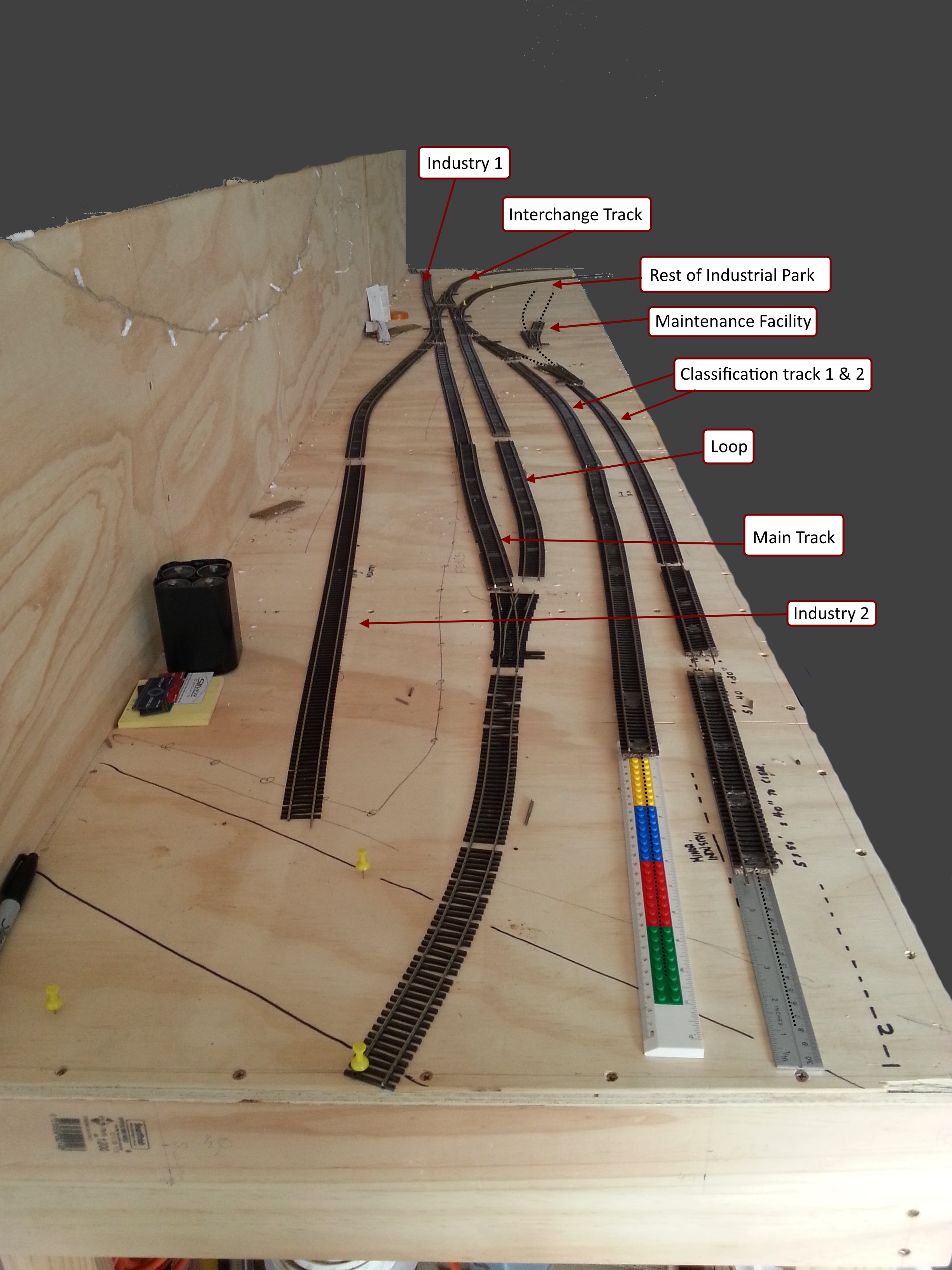
With measurements now completed on all of the storage and “yard” tracks our holding ability on all tracks suggests that the:

  • Main (at 1400 mm) can clear 7 standard cars,
  • Loop (at 1500 mm) can clear 8 standard cars.
  • Classification track 1(at 1800 mm) can clear 9 cars ,
  • Classification track 2 (at 1300 mm) can clear 6 cars, and
  • The total on-track yard capacity is 30 cars (not including the interchange as I consider the interchange loadings to be a part of this number).

Yard Occupancy

I don’t want to flood the yard on any one day so I expect that the total yard occupancy at maximum will be 50% of the total – leaving me with 15 cars maximum. So that even with a full train of 9 cars coming in from the interchange I can use Class 1 & 2 to store all of the cars and leave the main and the loop free to work. More on this though below.

Industry tracks

On the main board there are two industries:

  • Industry 1 is 800 mm long and can manage 4 cars
  • Industry 2 is 1600 mm long and can manage 8 cars
  • Interchange track (at 2400 mm) can clear 9 cars plus the loco. The interchange track is considered an industry also.

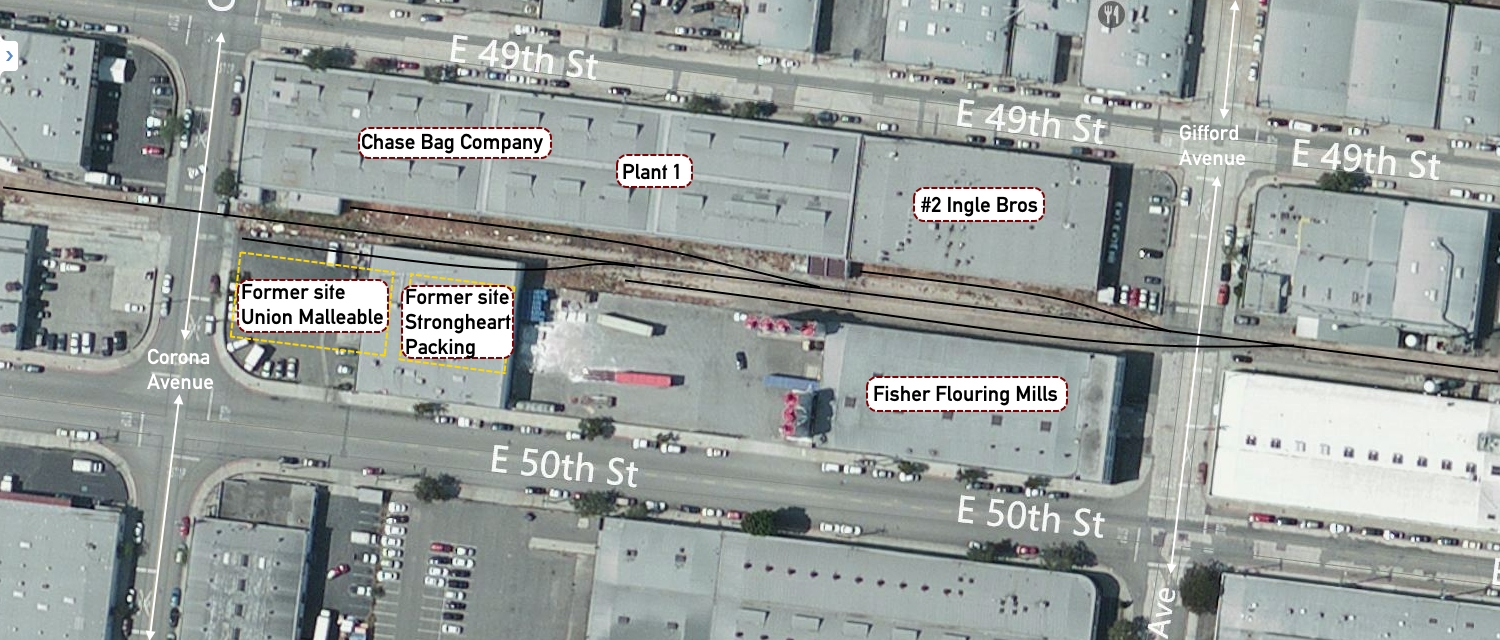
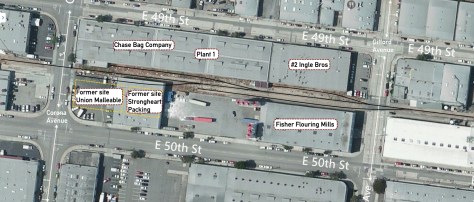
The trackage on the base of the L are to be built based on an article in Model Trains International #58, page 106 by Bruce Petty. While this was essentially an article on scratchbuilding the Strongheart Packing Co. there was also a track diagram included. While I cannot post the magazine article here for you, I can point you to Bruce’s website which has the same information and track diagram (link here)

The current track layout in this area bounded by East 49th and E 50th Street is somewhat different from that of 25 – 35 years ago, this is reflected in the two images here:
Strongheart Packing Co - Vernon CA

Image 1: Block bounded by 49th & 50th Street, and Gifford To Corona Ave

This is an overhead view of the same block as in the article, but several of the buildings have been removed; specifically Union Malleable and Strongheart Packing. Otherwise the track for the most psrt seems to be intact.

Vernon CA - 49-50th Street - Gifford to Corona Ave - Track Layout

Another overhead view showing a slightly different angle that puts the article map in perspective.

I’ll be leaving building’s in place at Ingle Bros. It is a nice, generic building, plain brick that will be easy to model. It will have the two car spots as on the plan. The Chase Bag Co will go. In it’s place I’m going to put a team track. This will ensure that I can have a range of cars in that spot, and in addition give a great view of the remainder of this section of the layout.

The other buildings will be changed slightly to give that 1970’s renewal look of tilt-up concrete construction so prevalent in Texas.

Industry occupancy

Just as for the yard, I do not want to flood the industry tracks with cars. There are two reasons for this:

  1. I like that industries are not always blocked with cars – this is also very prototypical, and
  2. I am aiming at maximum to have industries be 50-60 percent occupied

Thus the total car numbers of the main board will be:

  • Industry 1 holds on average 2 cars with a maximum of 3 cars
  • Industry 2 holds on average 4 cars with a maximum of 5 cars
  • Interchange holds on average 5 cars (rounded up from 4.5) to 7 cars.

As noted earlier it can clear up to 9 cars at any one time if needed; this ensures that the interchange and the yard tracks should never be flooded with cars to stop the operations of the railroad.

The industrial park (bottom of the L) boards will hold on average 7 cars using the same occupancy rate. In total then the maximum cars in and out of the layout (should all of the occupied spots be switched on one day) would be 17 cars. Luckily that is not going to happen because these car movements would be spread over 6 days.

I am hoping the average will be in the range of 4-5 cars per session. This meets my goal of a short switching session, but with plenty of interest for me as the crew. More on this later.

Site seeing March 20

I’ve said before that a photo provides more than just a visual image of an object, especially rail cars or locomotives. It provides context, and context is worth more than a thousand words to a modeller.

Site 1: Tim O’Connor’s Flickr Page

Tim’s been scanning his dad’s slides from the mid 1970s through early 1980; And they’re up on Flickr. Tim’s dad seems to have been pretty prolific in his photography. I look forward to seeing what else Tim might have in his Dad’s stash. (Link here)


Why I chose not to design my layout – Part 3

I wanted to show my working (as my Math teacher always encouraged me to do) on the layout design as it evolves to meet my needs. I was not happy with the way the original design performed when I looked at the yard throat design. There was an ‘irksome’ separation between the mainline and the branchline running into the future Industrial park extension. Image 1 below, shows my attempt to fix that issue; a simplified version of the first track layout.

New Layout Design - Take 2
Image 1: Take 2 on the layout design

The throat area is the set of switches around the Interchange track and the branch out to the rest of the industrial park. In mock operating sessions the biggest issue I had on the fist design was the lead out to the rest of the industrial park had crept down quite a way onto the upright of the L shaped boards. Keep in mind here that the other boards are not yet attached to the three boards in the image.

Additionally, I wanted to have a better yard throat, that was easier to switch through and took up less space.  After due reflection, the layout just didn’t look right for a small, smart industrial line with the smarts to build their own industrial park out of a couple of abandoned branch lines. Thus we arrive at version 3.

New Layout Design - Take 3
Image 2: Take 3 of the layout design

First there’s a better use of space,and visual appeal (to me anyway) with the long classification track #1, and the maintenance lead / class track # 2 being at the front end of the board.

All of it coming direct off the old main (now the interchange track). It simply feels better, and right in a way that the previous versions did not. I’ve run a quick thought exercise ops session on the new layout, and it also makes it easier to do business on the new layout. I’ll post the results of that a few days in the future once I have some other modelling work that I have to complete done.

On reflection I will be moving the switch (currently a Wye that will be replaced with a left #5) further back toward the camera to extend the run-around on both the main and the loop. This will stop just short of the road overpass and ensure that a loco can pull clear of the switch to allow the run-around move to take place. Additionally it will allow the

That’s it for me at the moment. Talk to you all later. If you have any questions let me know.